New Nav Station Bench and Desk Completed
on April 16, 2011 at 00:35
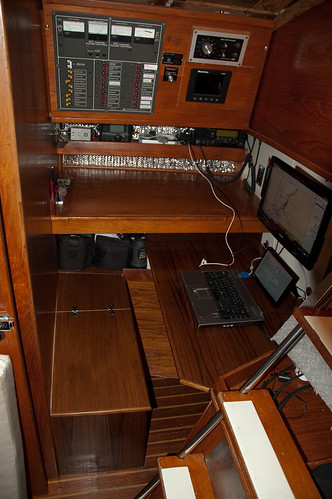
I am very pleased to show off the new nav station bench and and desk. This replaces the cooler and board I’ve been using for years. You can see more pics of the pieces coming together on flickr.
The 1/2” cabinet grade teak has all been finished with at least 4 coats of varnish. The desktop has an additional coat of a heavy duty varnish.
You can probably make out the hinges in the bench, it does open and has a pretty decent amount of storage.
The only thing left to complete is to put a locking clasp of some kind on the lid.
In addition to the desk I also mounted the new 19” Viore LED Monitor (LED19VH50). That’s the large monitor on the right of the picture. It’s mounted with a standard VESA mount and can directly off of 12VDC!!! The size of the monitor is important because It’s mounted on a door that opens and the monitor has to swing over the top of the original desk.
I’m VERY excited to have this completed. Next step in the aft berth is to put up the headliner; things are coming together !!!
I really like those bench seats with their storage, much better than the swivel chair we have now. Did you write this up before, I’ll go look, wondering about access to the wet locker, which Don turned into a electro locker on FFT
I’ve already hidden away soo much stuff in there I’m not sure how we lived without it. This is the first write up. let me know if you need anymore specifics.
There’s no way you could use the aft locker on DP for wet stuff, WAY too many wires in there for that along with the SSB, PC, Wireless, etc… nope it’s a server room really.
Access to the locker will be very easy though, the desk pops right out and the door opens up with the monitor attached. Also, in the picture you see a laptop (sans monitor) and a little monitor. Those won’t be there, just a USB keyboard and mouse (or maybe a touch pad). The PC will be in that aft locker. It gets here next week, more to come on that!!
Looks like a quite elegant installation! I use a mac mini at the nav station and use windows 7 on it for the nav programs. I am checking out the led monitor – 12 volts??? I have been looking around for something less power hungry! Thanks for the link to my site, I also have a link to yours! –TIM
Yes it is 12volts by that I mean the AC DC adapter outputs 12volts. So, it’s not wide input 12volts, ideally you’d have a DC regulator in front of it, but I’m going to try it without and see how it goes.
-p